
Building games
A game on tawks is a bot. Your bot holds the rules and the state, and players see the game as a workflow page that your bot keeps up to date. This page covers the kinds of games people play on tawks, how lobbies work, the game framework the first-party games are built on, how to record results, and how the 3D table games fit in.
It assumes you have a bot running already. If not, start with Your first bot and Writing a bot, and read Workflows for how pages, actions and server actions fit together.
Kinds of games on tawks
Daily puzzles in a channel
Connections, Earworm and Railyard are daily single-player puzzles. Each one is the page of a channel. Everyone who opens the channel gets their own workflow instance, plays today's puzzle, and can share a result card afterwards.
A daily puzzle does not need the game framework, because players never see each other's moves. It is an ordinary workflow:
- The starting server action loads today's puzzle and the player's progress.
- Every guess or move is a server action that checks it, saves it, and returns new responses.
- Your bot stores progress itself, keyed by user id and date.
- When the player finishes, put a share card in responses with
tawks_bot::share::ShareCardand show it with theShareResultdisplay.
The worked example in Workflows is a complete daily number guess built this way. Share cards and reminders are covered in Writing a bot.
Turn-based multiplayer games in a lobby
Rails, Cards, Midnight and Trivia are multiplayer games played in a lobby. Every player has their own workflow instance, but they all share one game. When one player acts, everyone's page changes, and each player sees only what they are allowed to see. These games are built on the game framework described below.
3D table games
Coven and Landlord are card games played around a 3D table in a lobby, with the party characters sitting in the seats. They run in a real-time room inside the first-party games bot rather than through workflow responses, and their 3D visuals are part of the tawks app. See Table games and the cards game.
Lobbies
What players see
A lobby is a temporary room inside a channel. When a channel allows lobbies, members see a create button next to the channel in the sidebar. Creating a lobby gives it a generated name and takes you into it. Others can join from the sidebar while it is open.
A lobby has:
- Voice and video. Everyone in the lobby can talk, and the lobby view shows a tile for each person.
- Chat. A text chat that belongs to the lobby.
- A game tab. The lobby owner picks a game from the game menu. Everyone in the lobby follows into the game tab, which is named after the game, and the owner can end the game or switch to another one. The lobby stays open around the game, so people keep talking while they play.
What your bot sees
When a lobby is on a game, each person in the lobby gets their own instance of that game's workflow. The instance starts with two inputs: lobby_id and niche_id. Your starting server action runs once per player.
For your bot, a lobby is the key that groups those instances into one match. The game framework reads lobby_id from every action and sends it to the game state for that lobby. Two lobbies playing the same game get two separate states.
The lobby's voice and chat are handled by tawks. A game can speak in the lobby's voice room with the framework's Speak effect, which reads a line of text aloud. Midnight uses it to narrate.
Starting a third-party game today
A lobby's game menu lists the first-party games plus any game activities a niche has turned on. A game built from workflow displays cannot be picked there, so start it from a channel instead:
- A channel page. A niche admin sets your workflow as a channel's page in channel settings, as described in Writing a bot. Everyone who opens the channel gets an instance with
channel_id,niche_id,niche_slugandchannel_slugas inputs. When there is nolobby_id, the framework groups instances by channel instead, so everyone in that channel shares one game. Give the page a "Take a seat" or "Start game" button, as the example below does. - A chat command. Your bot can listen for chat messages such as
!dueland reply with a link to the channel that hosts the game,/niche/<niche_slug>/<channel_slug>. Chat events are covered in Writing a bot.
A channel game has no voice of its own. Players who want to talk while they play can open a lobby in a channel that allows lobbies and keep the game open beside it.
A channel also has a "Lobby workflow" setting. Leave it on Default. Lobbies are created by the default lobby workflow, so pointing that setting at your own workflow does not give players a lobby with your game in it.
If your game needs several matches in one channel at the same time, keep them inside your game state, for example as a list of tables, and let each button send the table it belongs to.
The game framework
The framework crate,
game-framework, is open source in the tawks-dev repository. The trait and engine below are the ones the first-party games use. Names may still change before the first release.
The framework has two parts:
GameLogic, a trait you implement for your game state. It holds the rules and decides what each player can see.GameEngine<G>, which runs your game. It keeps one state per lobby, turns server actions into game actions, and pushes each player's view to their workflow instance.
The GameLogic trait
pub trait GameLogic: Sized + Send + Sync + 'static {
    type Action: serde::de::DeserializeOwned + Send;
    type View: serde::Serialize + Send + Clone;
    type Effect: std::fmt::Debug + Send + Sync;
    type InitArgs: Send + Sync + Clone + 'static;

    fn new(args: Self::InitArgs) -> Self;
    fn lobby_started(&mut self, _lobby_id: &str) {}
    fn update(&mut self, player_id: &str, action: Self::Action) -> anyhow::Result<Vec<Self::Effect>>;
    fn view_for(&self, player_id: &str) -> Self::View;
    fn get_player_ids(&self) -> Vec<String>;

    fn get_instance_id_for_player_id(&self, _player_id: &str) -> Option<String> { None }
    fn record_instance_id(&mut self, _player_id: &str, _instance_id: &str) {}
    fn should_fanout(&self, _action: &Self::Action) -> bool { true }
    fn tick(&mut self) -> Vec<Self::Action> { vec![] }
}
GameEngine requires Effect = GameEffect. Player ids are tawks user ids.
| Method | What it does |
|---|---|
new |
Builds a fresh state the first time a lobby or channel sends an action. InitArgs is shared by every state the engine creates, so put configuration and channels to the rest of your bot there. |
lobby_started |
Called once, right after new, with the id the state belongs to: the lobby id, or the channel id for a channel page. Keep it if you record results or save games. It can't make network calls, so to restore a saved game, load saved games when your bot starts, put them in InitArgs, and pick this lobby's up here. |
update |
Applies one action from one player. Return Err to refuse it; the message goes back to that player as the action's error and nothing changes. Return effects to ask the engine for side effects. |
view_for |
Builds what one player may see. The engine calls it separately for every player, so hidden information stays hidden: leave other players' hands, secret roles and unrevealed picks out of the view. |
get_player_ids |
Everyone who should receive a view after a change. Include spectators who have the page open if they should follow along. |
record_instance_id, get_instance_id_for_player_id |
The engine calls record_instance_id before every action with the acting player's workflow instance id. Store it, and return it from get_instance_id_for_player_id. Without these two, only the player who acted ever sees an update. The engine also calls it for tick actions with the player "system"; skip that one. |
should_fanout |
Return false for actions that should only refresh the caller, such as the starting "view" action. |
tick |
Called once a second while at least one player has a recorded instance. Return actions to apply them as the player "system". Use it for clocks and timeouts. A lobby whose players have no recorded instances for 10 ticks in a row stops ticking. Views are only sent after an action, so a change made inside tick reaches players once tick returns an action. For a countdown, send a deadline in the view and let the client count down (see Clocks under Patterns for richer games) rather than returning an action every second. |
GameEngine
let engine = Arc::new(GameEngine::<MyGame>::new(init_args, bot.clone()));
let play_id = engine
    .clone()
    .register_route("mygame.play", |ctx| Ok(MyAction::Play { card: ctx.get_input_as("card")? }))
    .await?;
register_route(name, mapper) registers a server action with your bot and returns its id. When the action runs, the engine:
- Reads
lobby_idfrom the instance. If there is none it useschannel_id, so a channel page has one shared game. - Calls your mapper with the
WorkflowResourceWithContextto build a game action. Inputs from the button are already inctx(see Workflows), and the acting user is inctx.workflow.user_idand in the$usercontext key. - Hands the action to the state for that lobby. Each lobby's state runs on its own task and handles one action at a time, so
updatenever races with itself. - Returns the caller's view as the
gameresponse. - Sends every other player in
get_player_idstheir ownview_forresult.
Two more ways to register an action:
register_route_with_resultworks likeregister_route, but ifupdatereturns aCompleteWorkfloweffect for the caller, the caller's instance is completed with it instead of receiving a view.register_state_handler(name, handler)runshandler(&mut state, ctx)inside the lobby's task and returns itsServerActionResultdirectly. Nothing is sent to the other players. Use it for private, one-player screens.
Game state lives in your bot's memory. When your bot restarts, or reconnects and builds a new engine, games in progress start over. Save anything that must outlive a match, such as ratings or decks, in your own storage. Bot restarts, under Patterns for richer games, covers what players see when that happens and how to save games in progress.
How views reach each player
Every view lands in the player's workflow instance under the response key game, next to lobby_id and a revision number in $rev. tawks uses $rev to drop a view that arrives after a newer one.
Your workflow reads the view like any other response. A display can use "{game.status}" in a template, "game.hand" as a list key, or Cond::response_equals("game.can_join", json!(true)) as a condition. The caller's reply follows the action's progress_node setting. Views sent to the other players always re-pick the node, so you can switch screens with node conditions on game values.
How actions come back
Players act through ordinary workflow actions. A button names an action of your workflow, the action targets the server action id that register_route returned, and the button's input_map arrives as inputs. Template values in input_map arrive as strings, so parse numbers on your side.
Effects
update returns a list of GameEffect values. The engine carries them out after the update:
| Effect | What happens |
|---|---|
CompleteWorkflow { user_id, message, responses, close_active_modal } |
Completes that player's instance with the given responses and message. |
ClearWorkflow { user_id, workflow_id, attach_as } |
Skips that player's view update for this action. Use it when another effect already sent that player something, so the view doesn't overwrite it. workflow_id and attach_as are not used yet. |
EndGameCleanup { user_id } |
Sends that player a final view without re-picking the node. |
InjectWorkflow(StartWorkflowFromInstanceArgs) |
Starts another workflow from that player's instance, for example a modal. game and lobby_id are added to its inputs. |
RunServerAction { instance_id, action_id, inputs } |
Runs a workflow action on an instance, as if the player had pressed it. |
Speak { text } |
Reads the text aloud in the lobby's voice room. It only has an effect in a lobby. |
MilestoneEvent { game_id, event_key, user_id, lobby_id, meta } |
Reports progress toward a milestone. Milestones are defined by tawks for first-party games, so an event for a game without milestones has no effect. |
Example: Number Duel
Two players each hold the numbers 1 to 5. Every round, both pick one in secret. The higher number wins the round, each number can be used once, and after five rounds the player with more round wins takes the duel. A round that runs out of time plays your lowest number for you.
The example shows the parts most games need: seating, a secret pick per player in view_for, a round clock in tick, a plain workflow page that reads game, and a result recorded when the duel ends. It uses the same imports as the first-party games, with the workflow types reached through tawks_bot::workflow.
[dependencies]
game-framework = { git = "https://github.com/timfeid/tawks-dev" }
tawks-bot = { git = "https://github.com/timfeid/tawks-dev" }
anyhow = "1"
serde = { version = "1", features = ["derive"] }
serde_json = "1"
tokio = { version = "1", features = ["macros", "rt-multi-thread", "sync"] }
tracing = "0.1"
duel.rs:
use std::cmp::Ordering;
use std::collections::HashMap;
use std::sync::Arc;

use anyhow::{Result, anyhow, bail};
use game_framework::engine::GameEngine;
use game_framework::{GameEffect, GameLogic};
use serde::{Deserialize, Serialize};
use serde_json::{Value, json};
use tawks_bot::types::UserResource;
use tawks_bot::workflow::CreateWorkflowDefinition;
use tawks_bot::workflow::builder::{
    Cond, WorkflowActionBuilder, WorkflowDefinitionBuilder, WorkflowDisplayBuilder,
    WorkflowNodeBuilder, WorkflowVisualBuilder,
};
use tawks_bot::workflow::service::WorkflowResourceWithContext;
use tawks_bot::{TawksBot, TawksSdk};
use tokio::sync::mpsc;

const HAND: [u8; 5] = [1, 2, 3, 4, 5];
const ROUND_SECONDS: u32 = 30;

#[derive(Deserialize)]
pub enum DuelAction {
    View,
    Join { name: String, place: Place },
    Play { value: u8 },
    Timeout,
    Rematch,
}

#[derive(Clone, Debug, Deserialize)]
pub enum Place {
    Lobby(String),
    Channel(String),
}

pub struct Standing {
    pub id: String,
    pub name: String,
    pub points: u32,
}

pub struct Finished {
    pub place: Place,
    pub standings: Vec<Standing>,
}

#[derive(Clone)]
pub struct DuelArgs {
    pub results: mpsc::UnboundedSender<Finished>,
}

struct Player {
    id: String,
    name: String,
    hand: Vec<u8>,
    pick: Option<u8>,
    points: u32,
}

pub struct Duel {
    args: DuelArgs,
    place: Option<Place>,
    players: Vec<Player>,
    instances: HashMap<String, String>,
    seconds_left: u32,
    last: String,
}

#[derive(Clone, Serialize)]
pub struct SeatView {
    name: String,
    points: u32,
    state: &'static str,
}

#[derive(Clone, Serialize)]
pub struct CardView {
    value: u8,
}

#[derive(Clone, Serialize)]
pub struct DuelView {
    status: String,
    last: String,
    seats: Vec<SeatView>,
    hand: Vec<CardView>,
    can_join: bool,
    over: bool,
}

impl Duel {
    fn seat(&self, player_id: &str) -> Option<usize> {
        self.players.iter().position(|p| p.id == player_id)
    }

    fn started(&self) -> bool {
        self.players.len() == 2
    }

    fn over(&self) -> bool {
        self.started() && self.players.iter().all(|p| p.hand.is_empty())
    }

    fn deal(&mut self) {
        for p in &mut self.players {
            p.hand = HAND.to_vec();
            p.pick = None;
            p.points = 0;
        }
        self.seconds_left = ROUND_SECONDS;
        self.last.clear();
    }

    fn settle_round(&mut self) {
        let picks: Vec<u8> = self.players.iter().filter_map(|p| p.pick).collect();
        if picks.len() < 2 {
            return;
        }
        for p in &mut self.players {
            let pick = p.pick.take().unwrap_or_default();
            p.hand.retain(|&v| v != pick);
        }
        let (a, b) = (picks[0], picks[1]);
        match a.cmp(&b) {
            Ordering::Greater => self.players[0].points += 1,
            Ordering::Less => self.players[1].points += 1,
            Ordering::Equal => {}
        }
        self.last = format!(
            "{} played {a}, {} played {b}",
            self.players[0].name, self.players[1].name
        );
        self.seconds_left = ROUND_SECONDS;
        if self.over() {
            self.report();
        }
    }

    fn report(&self) {
        let Some(place) = self.place.clone() else { return };
        let standings = self
            .players
            .iter()
            .map(|p| Standing { id: p.id.clone(), name: p.name.clone(), points: p.points })
            .collect();
        let _ = self.args.results.send(Finished { place, standings });
    }

    fn status_for(&self, me: Option<usize>) -> String {
        if !self.started() {
            return format!("Waiting for players ({}/2)", self.players.len());
        }
        if self.over() {
            let (a, b) = (&self.players[0], &self.players[1]);
            return match a.points.cmp(&b.points) {
                Ordering::Greater => format!("{} wins the duel", a.name),
                Ordering::Less => format!("{} wins the duel", b.name),
                Ordering::Equal => "The duel is a draw".to_string(),
            };
        }
        match me {
            Some(seat) if self.players[seat].pick.is_some() => "Waiting for your opponent".into(),
            Some(_) => format!("Pick a number. You have {} seconds.", ROUND_SECONDS),
            None => "Watching".into(),
        }
    }
}

impl GameLogic for Duel {
    type Action = DuelAction;
    type View = DuelView;
    type Effect = GameEffect;
    type InitArgs = DuelArgs;

    fn new(args: DuelArgs) -> Self {
        Self {
            args,
            place: None,
            players: Vec::new(),
            instances: HashMap::new(),
            seconds_left: ROUND_SECONDS,
            last: String::new(),
        }
    }

    fn record_instance_id(&mut self, player_id: &str, instance_id: &str) {
        if player_id != "system" {
            self.instances.insert(player_id.to_string(), instance_id.to_string());
        }
    }

    fn get_instance_id_for_player_id(&self, player_id: &str) -> Option<String> {
        self.instances.get(player_id).cloned()
    }

    fn get_player_ids(&self) -> Vec<String> {
        self.instances.keys().cloned().collect()
    }

    fn should_fanout(&self, action: &DuelAction) -> bool {
        !matches!(action, DuelAction::View)
    }

    fn update(&mut self, player_id: &str, action: DuelAction) -> Result<Vec<GameEffect>> {
        match action {
            DuelAction::View => {}
            DuelAction::Join { name, place } => {
                if self.seat(player_id).is_some() {
                    return Ok(Vec::new());
                }
                if self.started() {
                    bail!("Two players are already seated.");
                }
                self.place.get_or_insert(place);
                self.players.push(Player {
                    id: player_id.to_string(),
                    name,
                    hand: Vec::new(),
                    pick: None,
                    points: 0,
                });
                if self.started() {
                    self.deal();
                }
            }
            DuelAction::Play { value } => {
                let seat = self.seat(player_id).ok_or_else(|| anyhow!("Take a seat first."))?;
                if !self.started() || self.over() {
                    bail!("There is no round to play.");
                }
                let player = &mut self.players[seat];
                if player.pick.is_some() {
                    bail!("You already picked this round.");
                }
                if !player.hand.contains(&value) {
                    bail!("You already used your {value}.");
                }
                player.pick = Some(value);
                self.settle_round();
            }
            DuelAction::Timeout => {
                for p in &mut self.players {
                    if p.pick.is_none() {
                        p.pick = p.hand.iter().min().copied();
                    }
                }
                self.settle_round();
            }
            DuelAction::Rematch => {
                if self.seat(player_id).is_none() || !self.over() {
                    bail!("A rematch starts once the duel is over.");
                }
                self.deal();
            }
        }
        Ok(Vec::new())
    }

    fn view_for(&self, player_id: &str) -> DuelView {
        let me = self.seat(player_id);
        let hand = match me {
            Some(seat) if self.players[seat].pick.is_none() && !self.over() => self.players[seat]
                .hand
                .iter()
                .map(|&value| CardView { value })
                .collect(),
            _ => Vec::new(),
        };
        DuelView {
            status: self.status_for(me),
            last: self.last.clone(),
            seats: self
                .players
                .iter()
                .map(|p| SeatView {
                    name: p.name.clone(),
                    points: p.points,
                    state: if p.pick.is_some() { "picked" } else { "thinking" },
                })
                .collect(),
            hand,
            can_join: me.is_none() && !self.started(),
            over: self.over(),
        }
    }

    fn tick(&mut self) -> Vec<DuelAction> {
        if !self.started() || self.over() {
            return Vec::new();
        }
        self.seconds_left = self.seconds_left.saturating_sub(1);
        if self.seconds_left == 0 { vec![DuelAction::Timeout] } else { Vec::new() }
    }
}

fn display_name(user: &UserResource) -> String {
    if user.display_name.trim().is_empty() {
        user.username.clone()
    } else {
        user.display_name.clone()
    }
}

fn place(ctx: &WorkflowResourceWithContext) -> Result<Place> {
    if let Ok(channel_id) = ctx.get_input_as::<String>("channel_id") {
        return Ok(Place::Channel(channel_id));
    }
    Ok(Place::Lobby(ctx.get_input_as::<String>("lobby_id")?))
}

fn number(ctx: &WorkflowResourceWithContext, key: &str) -> Result<u8> {
    let value: Value = ctx.get_input_as(key)?;
    let n = match &value {
        Value::Number(n) => n.as_u64(),
        Value::String(s) => s.parse().ok(),
        _ => None,
    };
    n.and_then(|n| u8::try_from(n).ok())
        .ok_or_else(|| anyhow!("{key} must be a number"))
}

pub async fn register(bot: &TawksBot) -> Result<String> {
    let (results, inbox) = mpsc::unbounded_channel();
    tokio::spawn(file_results(bot.sdk.clone(), inbox));

    let engine = Arc::new(GameEngine::<Duel>::new(DuelArgs { results }, bot.clone()));
    let view = engine.clone().register_route("duel.view", |_| Ok(DuelAction::View)).await?;
    let join = engine
        .clone()
        .register_route("duel.join", |ctx| {
            let user: UserResource = ctx.ctx_required_as("$user")?;
            Ok(DuelAction::Join { name: display_name(&user), place: place(&ctx)? })
        })
        .await?;
    let play = engine
        .clone()
        .register_route("duel.play", |ctx| Ok(DuelAction::Play { value: number(&ctx, "value")? }))
        .await?;
    let rematch = engine
        .clone()
        .register_route("duel.rematch", |_| Ok(DuelAction::Rematch))
        .await?;

    bot.register_workflow(definition(&view, &join, &play, &rematch)).await
}

fn definition(view: &str, join: &str, play: &str, rematch: &str) -> CreateWorkflowDefinition {
    let text = |class: &str, s: &str| WorkflowDisplayBuilder::new(class).text(s).build();
    let button = |label: &str, input: Option<HashMap<String, Value>>, action: &str| {
        WorkflowDisplayBuilder::new("")
            .button(vec![text("", label)], input, action, "outline", "default")
            .build()
    };
    let action = |id: &str, target: &str| {
        WorkflowActionBuilder::new(id).run_server_action().target(target).progress_node(false).build()
    };

    let seats = WorkflowDisplayBuilder::new("flex flex-col gap-1")
        .list("game.seats", "s", vec![text("text-sm", "{s.name}: {s.points} ({s.state})")])
        .build();
    let hand = WorkflowDisplayBuilder::new("flex gap-2")
        .list(
            "game.hand",
            "c",
            vec![button(
                "{c.value}",
                Some(HashMap::from([("value".to_string(), json!("{c.value}"))])),
                "play",
            )],
        )
        .build();
    let join_button = WorkflowDisplayBuilder::new("")
        .condition(
            Cond::response_equals("game.can_join", json!(true)),
            vec![button("Take a seat", None, "join")],
        )
        .build();
    let rematch_button = WorkflowDisplayBuilder::new("")
        .condition(
            Cond::response_equals("game.over", json!(true)),
            vec![button("Rematch", None, "rematch")],
        )
        .build();

    let node = WorkflowNodeBuilder::new("Duel")
        .visual(
            WorkflowVisualBuilder::new("duel")
                .block(
                    "mx-auto flex w-full max-w-md flex-col gap-4 p-4",
                    vec![
                        text("text-xl font-bold", "{game.status}"),
                        text("text-sm text-zinc-400", "{game.last}"),
                        seats,
                        hand,
                        join_button,
                        rematch_button,
                    ],
                )
                .build(),
        )
        .build();

    WorkflowDefinitionBuilder::new("duel", "Number Duel")
        .description("Two players, five numbers each. The higher number takes the round.")
        .starting_server_action(view)
        .response("game", json!({ "status": "Loading...", "last": "" }))
        .add_actions([action("join", join), action("play", play), action("rematch", rematch)])
        .add_node("main", node)
        .build()
}

async fn file_results(sdk: Arc<TawksSdk>, mut inbox: mpsc::UnboundedReceiver<Finished>) {
    while let Some(done) = inbox.recv().await {
        let [home, away] = &done.standings[..] else { continue };
        let (lobby_id, channel_id) = match &done.place {
            Place::Lobby(id) => (Some(id), None),
            Place::Channel(id) => (None, Some(id)),
        };
        let args = json!({
            "lobby_id": lobby_id,
            "channel_id": channel_id,
            "game_id": "duel",
            "title": "Number Duel",
            "home_team": home.name,
            "away_team": away.name,
            "home_score": home.points,
            "away_score": away.points,
            "home_humans": 1,
            "away_humans": 1,
            "players": [
                { "user_id": home.id, "side": "home" },
                { "user_id": away.id, "side": "away" },
            ],
        });
        if let Err(error) = sdk.web_client.mutate::<_, String>("game_result_record", &args).await {
            tracing::warn!(%error, "recording the duel failed");
        }
    }
}
Call duel::register(&bot).await? where your bot registers its other workflows, inside the reconnect loop from Your first bot. It returns the workflow id, wf-duel-<your bot's user id>. Ask a niche admin to set it as a channel's page, open the channel in two browsers signed in as different people, and take a seat in each.
A few things to notice:
view_fornever includes the other player's pick. A seat only showspickedorthinkinguntil both picks are in, and thenlastreveals both numbers.- Spectators get updates too, because
get_player_idsreturns every instance that has opened the page, not just the two seated players. tickcounts the round clock down once a second and returnsTimeoutwhen it reaches zero. The engine applies it as the player"system".updatecannot make network calls, so the finished duel goes out through anmpscchannel inInitArgsto a task that records it.Joincarries aPlaceread from the instance.lobby_startedwould give the id too, but recording a result needs to know whether the id is a lobby or a channel.
Patterns for richer games
The Duel is small on purpose. These are the questions that come up once a game has hidden hands, timers and more than two players.
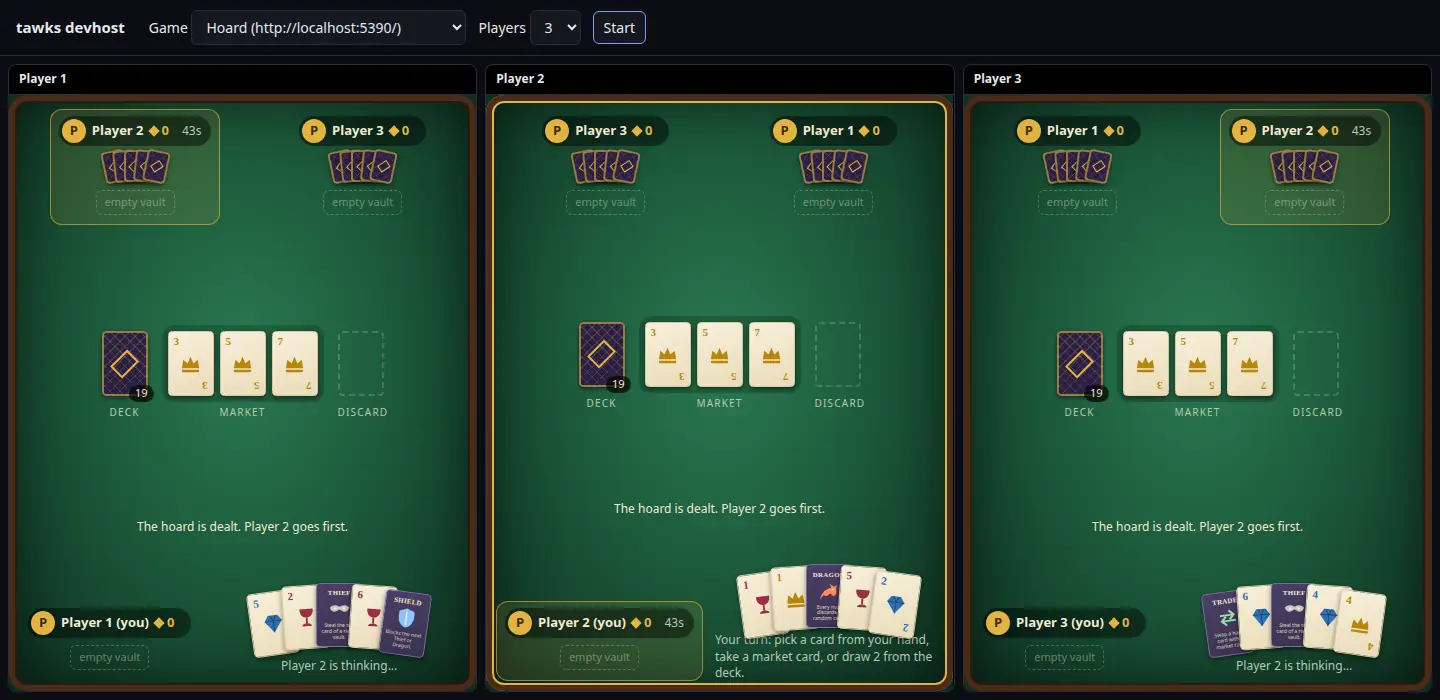
The Hoard example in devhost, one frame per player. The market and deck are shared, and each player's hand is face up only in their own frame, because view_for leaves the other hands out.
One move action or several
An activity can send every move through one action (activity.send) or name a separate action per move (activity.call). One action carrying a tagged enum is the simplest, and it's what the examples do:
#[derive(Deserialize)]
#[serde(tag = "type", rename_all = "snake_case")]
pub enum Input {
    Bank { card: usize },
    Cast { card: usize, target: Option<String> },
    Draw,
}
Reach for call and a second route when a move needs different handling on the server, such as register_route_with_result to finish the player's instance.
Animations
A view is a snapshot, so the client only sees where things ended up, not how they got there. To animate a card moving from a hand to a vault, keep a short event log in your game state and put the recent part of it in every view:
#[derive(Clone, Serialize)]
pub struct Event {
    pub seq: u64,
    pub kind: String,
    pub player: String,
    pub card: Option<CardView>,
}
Number events in order and keep the last 20 or so. The client remembers the highest seq it has played, animates any newer events, and then draws the state. A client that joins late or reloads skips straight to the state. Build each player's copy in view_for so events don't leak hidden cards: a rival's draw shows up as a face-down card.
Clocks
Put the deadline in the view instead of sending a view every second:
pub struct View {
    pub turn_ends_at_ms: u64,
    pub now_ms: u64,
    // ...
}
Set now_ms to your bot's clock when view_for runs. The client computes offset = now_ms - Date.now() each time a view arrives and counts down to turn_ends_at_ms - offset, so it doesn't matter whether the player's clock agrees with your bot's. Let tick check the deadline and return a timeout action once it passes; the views go out then.
Spectators
Everyone who opens your game gets a workflow instance and calls your view action, seated or not. Keep seats and instances separate: seats are the players, instances are everyone who should get a view. Return every instance from get_player_ids and give unseated people a view that shows the table without any hand.
If your view action returns false from should_fanout, a new watcher doesn't appear for anyone else until the next move. Return true for it when the table should show who is watching.
devhost has no spectator seat. Start with one more player than your game seats, and leave that frame unseated.
Reloading and reconnecting
When a player reloads, tawks loads your app again and sends init with the latest view it has for them, so a reload never needs your bot. The same happens when they leave the game tab and come back.
Bot restarts
Game state lives in memory, so a restart starts every lobby over. Players still see the last view they got, and their next move reaches a brand new, empty game. Two things keep that from being confusing:
- Handle moves from players the game doesn't know. Instead of a bare "you are not seated", say what happened, for example "This game restarted. Join again to play.", and send the view so their screen catches up.
- For long games, save state as it changes.
updatecan't make network calls, so send a copy through a channel inInitArgsto a task that writes it, and restore it inlobby_startedfrom games you loaded when the bot started.
View size
After each change every player gets their own view, one call per player. Keep views to what the screen needs: the table, your hand, recent events. A few kilobytes per view is typical. Moves from an activity are capped at 16 KB.
Results and score
Recording a result
A bot records a finished match with the game_result_record mutation, which the example calls through sdk.web_client.mutate. The arguments describe a two-sided match:
| Field | Meaning |
|---|---|
lobby_id or channel_id |
Where the match was played. One of the two is required. |
game_id |
Your game's key, such as "duel". Results and leaderboards are grouped by it. |
title |
Optional display name. Defaults to game_id. |
home_team, away_team |
Names for the two sides. |
home_score, away_score |
The final score. The higher score wins; equal scores are a draw. |
home_humans, away_humans |
How many people played on each side. Use 0 for a side played by the computer. |
players |
{ user_id, seat?, side? } for each player, with side set to "home" or "away". |
It returns the result's id. When the match was played in a lobby, tawks also posts a one-line summary such as Ben 4 at Ana 1 (Final): Ben beat Ana to the lobby chat.
Each player with a side is awarded points on their tawks score: 10 for playing, 50 more for a win, 25 more for a shutout, and 25 more for winning by 3 or more. A result against a side with no humans counts half.
For a game with three or more players, put the winner alone on home with their score, and everyone else on away with the runner-up's score. The winner gets the win, everyone else gets credit for playing, and the lobby summary reads naturally. Set home_humans to 1 and away_humans to the number of other people.
Two queries read results back for any game_key:
game_result_leaderboard { game_key }: players with games, wins and losses.game_result_recent { game_key, limit? }: the latest results, 10 by default and up to 50.
The tawks app does not show these for third-party games yet. Show them on a page of your own.
Showing what someone is playing
presence_set_activity { user_ids, activity: { game, detail? }, ttl_secs? } shows "Playing Number Duel" (with the detail after it) next to those players in the member list and on their profile cards. It expires after ttl_secs, 120 by default, so refresh it while the game runs and send activity: null to clear it.
Other score
First-party daily puzzles also award tawks score directly through a built-in server action. That action is limited to first-party games, so a third-party game's score comes from recorded results. Milestones are also defined by tawks and exist for first-party games only.
Table games and the cards game
The games in this section are first-party games. Their source will be in the open-source games repository, and new games of this kind are added there.
Table games
Coven (a hidden-role game for 4 to 12 players) and Landlord (a property trading card game for 2 to 5) are table games. They run in the party room, the same real-time room that hosts the party minigames. The lobby owner picks one from the game menu, players take seats around the table, and the room can fill empty seats with practice bots.
A table game implements the TableGame trait:
pub trait TableGame: Send {
    fn key(&self) -> &'static str;
    /// One seat acts; the error is the sentence that seat should read.
    fn act(&mut self, seat: u8, action: Value) -> Result<(), String>;
    fn tick(&mut self, dt: f32);
    /// Settles the current phase the way its clock would.
    fn hurry(&mut self);
    /// A practice bot takes its turn; the default is to let the clock decide.
    fn bot_act(&mut self) {
        self.hurry();
    }
    fn pending_actors(&self) -> Vec<u8>;
    fn view_for(&self, seat: Option<u8>) -> Value;
    fn log_len(&self) -> usize;
    /// The seats that won, once the game is over.
    fn winners(&self) -> Option<Vec<u8>>;
}
It is registered with a TableSpec { key, name, min_players, max_players, create }, where create(players, seed) builds a new game. How the room drives it:
- Seats. Seats are numbered
0..playersaround the table. A spectator'sview_forgetsNone. - Actions. A move from a player arrives as JSON and is handed to
actunchanged. Parse it into your own action type. AnErrstring is shown to that player only, so write it as the sentence they should read. - Clocks. The room calls
tickmany times a second. When a phase's clock runs out, call your ownhurry, which settles the phase the way a timeout would. - Bots and leavers. When every seat in
pending_actorsis a practice bot or a disconnected player, the room waits a moment and callsbot_act. The default lets the clock decide. Landlord overrides it with a real bot; Coven keeps the default. - Updates. The room sends fresh views when
log_lenchanges, so add to your log whenever something visible happens. - Views.
view_formust return a JSON object. The room addsseats(name, avatar, character and connection for each seat) andme(the viewer's seat), so do not use those two keys yourself. - The end. Once
winnersreturnsSome, the room shows the results and returns to the lobby. Table games do not record results yet.
Keep all randomness on a seeded generator built from seed, so a game can be replayed in tests.
Contributing a table game
Once the games repository is open, a new table game is a pull request there:
- Write the game as a type that implements
TableGame, with a constructor that takes the player count and a seed. - Register it with a
TableSpecnext to Coven and Landlord. - Add tests that play whole games with bots and check that
view_forkeeps every hand private. Landlord's tests are a good model.
The 3D table, cards and on-screen controls for each table game are built into the tawks app for now. A new table game therefore also needs its client side added to tawks before players can see it, and the tawks team does that part. To draw your own table instead, ship it as a game activity.
The cards game
Cards is a collectible card game with packs, decks and a draft, played on a 3D battlefield. Unlike the table games it runs on the game framework: its state implements GameLogic, every player's view arrives under game, and clicks on the battlefield come back as server actions. Only its 3D battlefield is special. It is built into the tawks app, and a beta of the same game also runs as a game activity, the way any third-party game can.
Where to go next
- Workflows for nodes, conditions and actions, which every game page is built from.
- Display reference for the displays you can use on a game page.
- Game activities for games that bring their own web app.