
Game activities
An activity is a game whose screen is your own web app. Your bot keeps the rules and the state, as with any game on tawks, but instead of building the page from displays you point tawks at a URL. tawks loads it in a frame inside the lobby or channel and passes state and moves between the frame and your bot.
Use an activity when displays are not enough: a canvas or WebGL game, real-time input, your own art and animation. If your game is buttons, lists and text, a normal workflow page is simpler. See Building games.
How it fits together
- Your bot registers a workflow, as in Workflows, and then registers the activity: a name, an icon and the URL of your web app.
- Your workflow has a page with one
activitydisplay. It names the response key that holds the game state and the action that receives moves. - Your web app runs in the frame. It says hello to tawks, receives the state, draws it, and sends moves back.
- A niche admin turns your game on for their niche. Players then pick it from the game menu in any lobby of that niche.
Each player has their own workflow instance, so each frame only ever receives that player's state. With the game framework, that is exactly what view_for returns, so hidden cards stay hidden.
The workflow
The display takes the response key to read and the action to run for moves:
let board = WorkflowNodeBuilder::new("Board")
    .layout("min-h-screen w-full relative")
    .visual(
        WorkflowVisualBuilder::new("board")
            .tile(vec![WorkflowDisplayBuilder::new("absolute inset-0").activity("game", "input").build()])
            .build(),
    )
    .build();

WorkflowDefinitionBuilder::new("tictactoe", "Tic-tac-toe")
    .starting_server_action(&routes.view)
    .response("game", json!(null))
    .add_action(WorkflowActionBuilder::new("view").run_server_action().allow_while_loading().target(&routes.view).build())
    .add_action(WorkflowActionBuilder::new("input").run_server_action().target(&routes.input).build())
    .add_node("board", board)
    .build()
Whatever your app sends with send arrives at the input action as a single input named input. With the game framework, map it in the route:
let input = engine
    .register_route("tictactoe.input", |ctx| {
        let input: Value = ctx.get_input_as("input")?;
        Ok(Action::Input(serde_json::from_value::<Input>(input)?))
    })
    .await?;
Every time the game response changes, tawks forwards the new value to the frame.
Registering the activity
Register the workflow first, then the activity with the id register_workflow returned. Activity is tawks_bot::Activity:
let workflow_id = bot.register_workflow(workflow(&routes)).await?;
bot.register_activity(
    &Activity::new(&workflow_id, "Tic-tac-toe", "https://play.example.com/tictactoe/")
        .description("Three in a row")
        .icon("game")
        .players(2, 2),
)
.await?;
Register on every start, as you do with workflows. Registering again updates the name, icon and URL.
iconis shown in the game menu. Use a name from the icon list in the Display reference; other names draw a placeholder.players(min, max)is shown to players. Enforcing it is up to your game.- The URL must use
https. While you develop,http://localhostandhttp://127.0.0.1are allowed too, and only you will be able to load them. - The URL can't be on
tawks.appor any of its subdomains.
Turning it on in a niche
An activity shows up in a niche only when both of these are true:
- Your bot is a member of the niche.
- A niche owner or admin has turned the game on under Settings → Games.
Players then open a lobby, open its game menu and pick your game. Everyone in the lobby gets the game tab, each with their own frame.
Your web app
The frame
tawks loads your URL in a sandboxed frame:
- Scripts run, and pointer lock, fullscreen, gamepads and autoplay are allowed.
- The frame has no origin of its own, so there are no cookies,
localStorageor IndexedDB. Keep everything that matters in your bot's state. - Popups, form submission and navigating the tawks page are blocked. Use buttons and your own UI instead of
<form>submits,alertorwindow.open. - Every request your app makes, including its own scripts, sends
Origin: null. Your server must answer withAccess-Control-Allow-Origin: *for scripts, styles, fonts, JSON and images. The same goes for images you draw into WebGL or read back from a canvas: setcrossOrigin = "anonymous"and serve them with that header. - Size the app to fill its window. The frame fills the game tab, and players can make it fullscreen.
Talking to tawks
The protocol is a handshake over postMessage, then messages on a private MessagePort:
- Your app posts
{ protocol: "tawks.activity", version: 1, type: "hello" }towindow.parent, repeating every half second until tawks answers. - tawks answers with
type: "welcome"and transfers a port inevent.ports[0]. Everything after this goes over that port. - tawks sends
{ type: "init", me: { id }, lobby: { id } | null, state }. - tawks sends
{ type: "state", state }whenever the state changes.
Your app sends:
{ type: "send", id, input }to run the workflow's move action withinputas its input.{ type: "call", id, action, inputs }to run another action of your own workflow, for games that use several actions. Action ids may use letters, digits and_ . : -, and input keys can't start with$.
tawks answers each send and call with { type: "result", id, ok: true } once your bot has it, or { type: "result", id, ok: false, error }. The new state arrives separately as a state message.
Limits:
- A move can be at most 16 KB of JSON.
- An app can send 20 moves a second, with bursts up to 40. Moves beyond that are refused with an error.
The tawks-dev repository has this as the package @tawks/activity-sdk, with a working example in examples/tictactoe. If you would rather not depend on it, here is the same helper to copy into your app:
type Json = null | boolean | number | string | Json[] | { [key: string]: Json };

export type Activity<State> = {
  me: { id: string };
  lobby: { id: string } | null;
  readonly state: State;
  onState(listener: (state: State) => void): () => void;
  send(input: Json): Promise<void>;
  call(action: string, inputs: { [key: string]: Json }): Promise<void>;
};

export function connect<State = Json>({ timeoutMs = 10_000 }: { timeoutMs?: number } = {}): Promise<Activity<State>> {
  return new Promise((resolve, reject) => {
    const hello = { protocol: 'tawks.activity', version: 1, type: 'hello' };
    const say = () => window.parent.postMessage(hello, '*');
    const retry = setInterval(say, 500);
    const timeout = setTimeout(() => done(new Error('tawks did not answer')), timeoutMs);

    function done(error?: Error) {
      clearInterval(retry);
      clearTimeout(timeout);
      window.removeEventListener('message', onWelcome);
      if (error) reject(error);
    }

    function onWelcome(event: MessageEvent) {
      if (event.source !== window.parent || event.data?.type !== 'welcome' || !event.ports[0]) return;
      done();
      attach(event.ports[0]);
    }

    function attach(port: MessagePort) {
      let state: State;
      let nextId = 1;
      const listeners = new Set<(state: State) => void>();
      const pending = new Map<number, { resolve: () => void; reject: (error: Error) => void }>();
      const request = (message: object) =>
        new Promise<void>((resolve, reject) => {
          const id = nextId++;
          pending.set(id, { resolve, reject });
          port.postMessage({ ...message, id });
        });

      port.onmessage = ({ data }) => {
        if (data.type === 'init') {
          state = data.state;
          resolve({
            me: data.me,
            lobby: data.lobby,
            get state() {
              return state;
            },
            onState(listener) {
              listeners.add(listener);
              return () => listeners.delete(listener);
            },
            send: (input) => request({ type: 'send', input }),
            call: (action, inputs) => request({ type: 'call', action, inputs }),
          });
        } else if (data.type === 'state') {
          state = data.state;
          listeners.forEach((listener) => listener(state));
        } else if (data.type === 'result') {
          const waiting = pending.get(data.id);
          pending.delete(data.id);
          if (data.ok) waiting?.resolve();
          else waiting?.reject(new Error(data.error));
        }
      };
      port.start();
    }

    window.addEventListener('message', onWelcome);
    say();
  });
}
Using it:
const activity = await connect<View | null>();
render(activity.state);
activity.onState(render);
cell.addEventListener('click', () => activity.send({ type: 'move', cell: 4 }));
Treat state as the only truth. Draw whatever arrives, and don't apply a move locally until the new state comes back. Your bot checks every move, so a player who edits your app can only send moves your rules reject.
Push-to-talk
Key presses inside the frame never reach tawks, so a player's push-to-talk key stops working while the game has focus. tawks tells your app the player's binding with { type: "push_to_talk", binding }. binding is a KeyboardEvent.key in lower case, mouse3 to mouse5 for mouse buttons, or null when push-to-talk is off. Post { type: "push_to_talk", down: true } on the port when that key or button goes down and down: false when it comes up, and also send down: false when the window loses focus.
Developing locally
Without tawks
The tawks-dev repository has devhost, a small stand-in for tawks that runs on your machine. It answers the calls your bot makes, runs your server actions, and shows your app in one frame per fake player, with the same sandbox, messages and limits as a real lobby. It shows game activities. For a page built from workflow displays, use the playground: its plug button connects to devhost, loads the pages your bot registered, and sends their server actions to your bot. The first time, your browser asks whether the site may reach apps on your device; allow it, since devhost runs on your machine.
cargo run -p tawks-devhost
It listens on port 8787; set DEVHOST_PORT to use another. Point your bot at it and start your app's dev server. BOT_TOKEN can be any name, but give each bot its own, since devhost tells bots apart by it:
RSPC_URL=http://localhost:8787/rspc EVENTS_WS_URL=ws://localhost:8787/events BOT_TOKEN=mygame cargo run
Open http://localhost:8787, pick your game, choose how many players, and press Start. Each frame is a different player, so you can play every seat yourself. Every Start opens a new lobby, so your bot starts a fresh game. The log under the frames shows what your bot said in the lobby, and any call or result devhost does not fake yet. A move your game refuses also shows there as an error, which is expected.
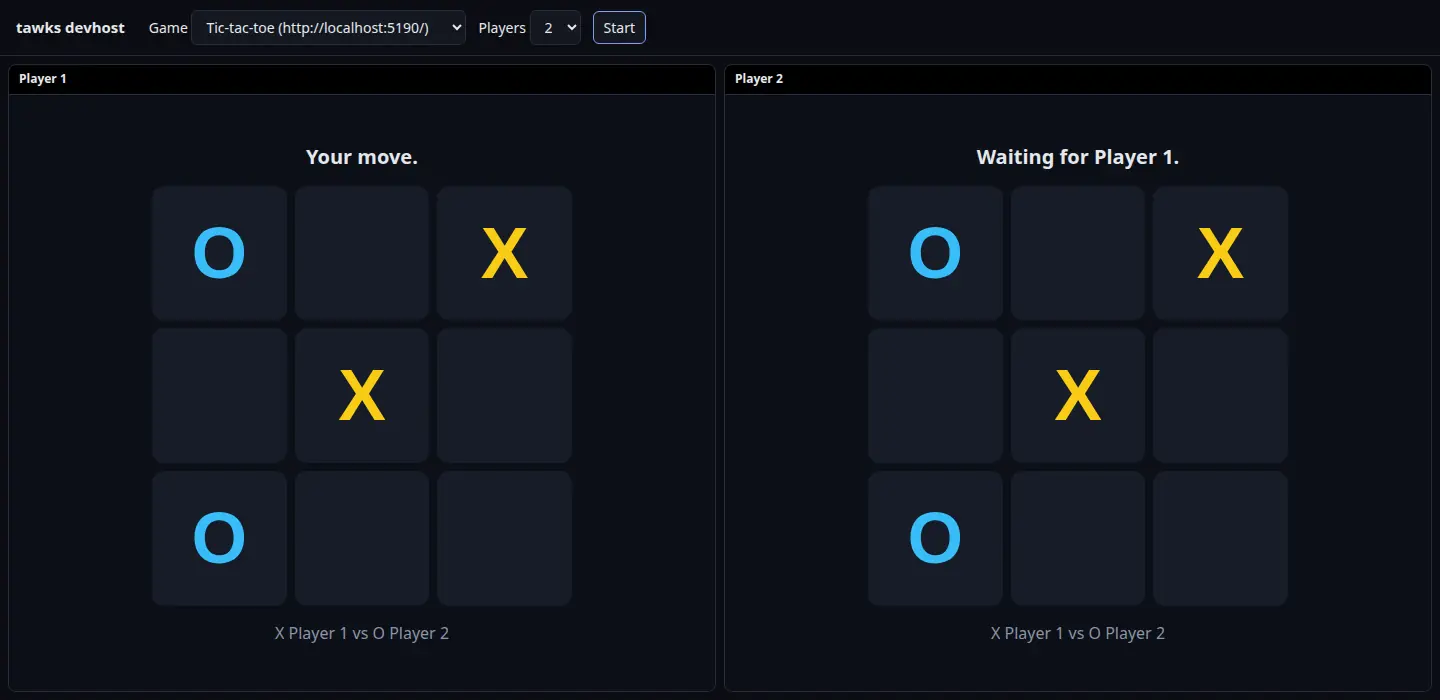
The examples register their app at a localhost address by default. Set CLIENT_URL when you run one to point it somewhere else, such as another port or a deployed https build.
In the sandbox
The sandbox at https://sandbox.tawks.app is devhost hosted for everyone. Your bot runs wherever you run it, with its own database and services, and connects to the sandbox instead of tawks. Anyone can then play your game on the Play page, every seat side by side, and share a link to a lobby, all without a niche of your own.
- Make a sandbox bot at sandbox.tawks.app/sandbox/token. You sign in with your tawks account, pick a bot name, and get a token, shown once.
- Run your bot against the sandbox:
RSPC_URL=https://sandbox.tawks.app/rspc EVENTS_WS_URL=wss://sandbox.tawks.app/events BOT_TOKEN=sbx_... cargo run
- Register your activity with an
httpsclient URL, so every player's browser can load it. - Open the Play page, pick your game, choose the seats and press Start.
The sandbox behaves like devhost, with a few differences:
- Lobbies live in memory and close after half an hour without use. Each visitor gets lobbies of their own, and the Copy link button shares one.
- A sandbox bot can register 20 workflows and 100 server actions, and each workflow can be at most 256 KB. An activity must use one of the bot's own workflows.
- Each tawks account can have five sandbox bots. Delete one on the token page to make another; deleting it stops its token at once.
- Nothing reaches real tawks: no niches, no notifications, no score.
The sandbox is devhost with DEVHOST_PUBLIC_HOST set, so you can run one yourself from the tawks-dev repository with docker build -f tools/devhost/Dockerfile ..
On tawks
- Run your app on
http://localhostwith a dev server that sendsAccess-Control-Allow-Origin: *. - Register the activity with that URL from your bot.
- Turn the game on in a niche you own, open a lobby there and pick it from the game menu.
Only your own browser can reach localhost, so other players see a blank frame until you register the real https URL.
Where to go next
- Building games for lobbies, the game framework,
view_forand recording results. - Workflows for actions and server actions.