
Workflows: UI as data
A tawks bot never ships HTML or JavaScript. It describes its screens as data, registers that description with tawks, and answers button presses with new data. The tawks app on web, desktop and mobile turns the description into a page. This page explains the pieces, follows one click from the user to your bot and back, and ends with a complete small bot.
Everything here is available through the tawks-bot crate as tawks_bot::workflow::.... Writing a bot covers connecting and registering.
The mental model
Definition
A CreateWorkflowDefinition is what you register. You build it with WorkflowDefinitionBuilder:
| Field | Builder method | Meaning |
|---|---|---|
id |
new(id, name) |
Your key for the workflow, such as "guess". tawks scopes it to your bot as wf-<id>-<bot user id>. |
name |
new(id, name) |
Display name. |
description |
.description(..) |
Optional text. |
responses |
.response(key, value), .responses(map) |
Initial values for the instance's response map. |
context |
.context(key, value) |
Initial values for the instance's context map. |
nodes |
.add_node(id, node) |
The screens. Insertion order matters (see below). |
actions |
.add_action(a), .add_actions(iter) |
Named things the UI is allowed to trigger. |
starting_server_action |
.starting_server_action(id) |
A server action that runs as soon as an instance starts. Pass the id that register_server_action returned. |
multi_instance_per_user |
.multi_instance_per_user() |
Off by default, so starting the workflow again for the same user resumes their open instance. Turn it on when one user needs several at once. |
.build() returns the CreateWorkflowDefinition you pass to TawksBot::register_workflow.
Instance
Every user who opens your workflow gets an instance. It has:
responses: a JSON map. This is the state the UI reads. Almost every display looks up its data here.context: a second JSON map that is never sent to the user's app. tawks writes$user(the acting user'sUserResource) and$anonymous(true for guests) into it on every action.current_node_id: which node is on screen.status:active,waiting,completed,cancelledorfailed.
The app receives the instance's responses, status and current node, plus the visuals of the current node only. Your bot sees everything, including context, in WorkflowResourceWithContext.
A channel page starts a fresh instance each time a user opens it. Anything you need to remember between visits, such as today's plays or a user's streak, belongs in your bot's own storage. Rebuild the view from it in the starting server action.
Nodes
A WorkflowNode is one screen. Build it with WorkflowNodeBuilder::new(title):
.visual(v)/.visuals(iter): what to draw..condition(c): aNodeConditionthat must hold for this node to be picked..parent_id(id): makes this node a child of another node..description(..),.layout(..): optional metadata. The app does not display node titles or descriptions, so they are for your own reference.
A good structure is one root node plus one child per view, each child gated on a response value. A daily puzzle might have a root main (a loading message) and children play, board, me and rules, each with Cond::response_equals("pz_view", json!("...")). Switching tabs is then a server action that sets pz_view.
How tawks picks a node:
- When an instance starts, it takes the first root node (in the order you called
add_node) whose condition passes. - After an action whose
progress_nodeis true, it walks up to the topmost parent of the current node and looks at that root's direct children, sorted by node id. It picks the first child with a real condition that passes. If none passes, it picks the first child with no condition (orAlways). If there is no such child, it falls back to the root.
Because children are sorted by id, keep their conditions mutually exclusive. Otherwise the alphabetically first match wins.
Visuals
A node holds a list of WorkflowVisual { id, display: DisplayVisual }. Visuals are the top-level regions: a Block of content, a Sticky header or footer, a Modal, a Tile slot, a Notification, an Animation or a Chat. Build them with WorkflowVisualBuilder::new(id) and one of .block(..), .sticky(..), .modal(..), .tile(..), .notification(..), .animation(..), .chat(..), then .build(). Most pages are a single Block.
Displays
Inside a visual you nest WorkflowDisplay { class, type }. class is a string of Tailwind utility classes. type is a DisplayType variant: Text, Div, List, Button, Form, Input, Condition, Image and so on. Build one with WorkflowDisplayBuilder::new(class), a variant method, and .build():
WorkflowDisplayBuilder::new("text-sm text-zinc-300").text("{pz_status_line}").build()
The Display reference lists every display with what it reads and what it fires.
Templates and keys
A display gets data out of responses in two ways:
- Templates. String fields written with braces:
"{pz_message}","{f.name}","{w.class}". A path is dot separated and walks into objects. If a path does not resolve, the braces stay in the output as literal text, so show optional values behind aCondition. Objects are inserted as JSON.{$user_id}resolves to the instance owner's id. Every display'sclassis also a template, so you can compute styling per item: send"class": "h-16 w-full ..."with each word in a grid and use"{w.class}"on the display. - Keys. Fields named
items_key,key,value_keyand similar take a bare path, not a template:"pz_grid", not"{pz_grid}".
List, Table, Carousel and the list-style inputs take an as name. Each item is added to the scope under that name, so children can write {w.word}.
Inputs
DisplayType::Input { id, input } draws a form control. id is the response key the value is written to. WorkflowInput carries the InputType (text, number, select and so on), required, an optional readonly condition, an optional default_value and an optional on_change_action. An input's value reaches your bot in one of two ways: from inside a Form, or through on_change_action for the controls that support it. The Display reference has the details per input.
Actions
A WorkflowAction is a named entry the UI may trigger. Every action_id you put on a button, form or carousel refers to one of these by its id, never to a server action directly. Build them with WorkflowActionBuilder::new(id):
| Builder method | ActionType |
What happens |
|---|---|---|
.run_server_action() with .target(server_action_id) |
RunServerAction |
Calls your server action. Without a target, the action's own id is used as the server action id. |
.transform_responses(ops, reconcile_node) |
TransformResponses |
Edits responses with TransformOps, without a round trip to your bot. |
.transform_then_run(ops, reconcile_node, server_action_id, input_map) |
TransformThenRun |
Applies the ops, then calls the server action. |
.next_node() |
NextNode |
Moves to .target(node_id) if set, otherwise to the first valid child. |
.previous_node() |
PreviousNode |
Goes back to the previous node. |
.submit() |
Submit |
Completes the instance. |
.cancel() |
Cancel |
Cancels the instance. |
.start_workflow(..), .start_injected_workflow(..) |
StartWorkflow |
Starts a child workflow, optionally shown in a tile or a modal. |
.noop() |
Noop |
Nothing. |
Other builder flags:
.progress_node(bool)defaults totrue. When true, tawks re-picks the node after the action. Set it to false if the action should never change the screen, for example on a single-node page..allow_while_loading()lets the action run while another server action is still in flight. Without it, a second click during a pending action is refused.
TransformOp has Set, Remove, MergeObject, Append, AppendUnique, FilterArray, MapArray, Copy, Move, When { cond, ops, else_ops }, and the effect ops EmitRunServerAction, EmitCancel, EmitNextNode and EmitPreviousNode. Paths address responses by default and context when prefixed with $context.. TransformCond has Always, Not, And, Or, Exists, Equals, ListNotEmpty and EqualsPath. There are no builder helpers for these, so you write the enum values directly. Transforms suit small instant changes such as toggling a local selection. Most bots send every change through a server action and keep all logic in one place.
Conditions
NodeCondition gates nodes and Condition displays. Helpers live on Cond:
| Variant | Helper |
|---|---|
Always |
Cond::always() |
ResponseExists(path) |
Cond::response_exists(path) |
ResponseEquals { field, value } |
Cond::response_equals(path, json!(..)) |
ResponseListEmpty(path) |
Cond::response_list_empty(path), Cond::response_list_not_empty(path) |
Gte { field, value } |
Cond::gte(path, json!(..)) |
SomeInList { list, as, condition } |
Cond::some_in_list(list, as, cond) |
Not, And, Or |
Cond::not, Cond::and, Cond::or |
Node conditions are evaluated by tawks and Condition displays by the app, against the data each one has. To get the same answer in both places:
- Compute booleans in your bot (
pz_has_error,pz_playing) and test them withCond::response_equals(.., json!(true)). This is the most reliable pattern. - Use
Gteonly on nodes, not inConditiondisplays. - Display conditions only see responses, never context.
- In the app,
ResponseExiststreatsnulland""as missing, andResponseListEmptyneeds an actual empty array. Send[]rather than leaving the key out.
Server actions
A server action is a function your bot registers:
let id: String = bot.register_server_action("guess.load", handler).await?;
register_server_action returns the canonical id, sa-<name>-<bot user id>. Pass that id to .target(..) and .starting_server_action(..). Register the server actions first, then build and register the definition with the returned ids.
The handler receives a WorkflowResourceWithContext: the instance (ctx.workflow, including responses) and its context (ctx.context, with $user and $anonymous). By the time your handler runs, whatever the app sent with the action is already merged into ctx.workflow.responses.
The handler returns a ServerActionResult. The ones bots use most:
| Variant | Effect |
|---|---|
UpdateResponses(map) |
Merges the map into responses. With progress_node, re-picks the node. |
UpdateContext(map), UpdateContextAndResponses { context, responses } |
Same, for context. |
NextPage { page_id } |
Jumps to a node by id. |
CompleteWorkflow { responses, close_active_modal, message } |
Completes the instance. |
CancelWorkflow |
Cancels it. |
Error(String) |
Fails the action. The view stays as it was and the loading state clears. |
None |
No change. |
More variants handle child workflows, waiting and scheduled jobs: StartNewWorkflow, StartAndWaitWorkflow, WaitForPredicate, ScheduleJobs, Reset, ReplaceWithNew and ReplaceWithInstance.
If UpdateResponses carries a $rev number lower than the one the instance already holds, tawks drops it as a late reply. Use it if your handlers can finish out of order.
Lifecycle of an action round trip
Take a player in a word puzzle tapping the word "BASS". The button was built as:
WorkflowDisplayBuilder::new("{w.class}")
    .button(
        vec![text("", "{w.word}")],
        Some(HashMap::from([("word".to_string(), json!("{w.word}"))])),
        "toggle_word",
        "ghost",
        "default",
    )
    .build()
- Click. The app interpolates each input value against the current scope, giving
{ "word": "BASS" }. The button dims and ignores further clicks while the action is pending. The app callsworkflow_process_actionwith{ instance_id, action_id: "toggle_word", inputs }. - Merge. tawks checks that the caller may act on this instance, writes
$userand$anonymousinto context, and merges the inputs intoresponses.responses.wordis now"BASS". - Action lookup. tawks finds the workflow action
toggle_word. It isRunServerActionwith its target set to yoursa-puzzle.toggle_word-<bot user id>. - Dispatch. tawks sets
$loading: truein responses, marks the instancewaiting, and sends your bot aWorkflowRequestServerAction { action_id, id, workflow }over the events socket. While it waits, inputs are read-only and other actions are refused unless they were built with.allow_while_loading(). - Your handler.
TawksBot::startmatchesaction_idto your registered handler and calls it. The handler readsresponses.wordand the current selection, updates the selection, and returnsServerActionResult::UpdateResponses(view)with every key the screens need. - Reply. The SDK sends the result back with
workflow_respond_server_action { token: id, result }. If the handler returnedErr, the SDK sendsServerActionResult::Errorinstead. A request with no reply times out after 60 seconds. - Apply. tawks clears the loading state, merges the responses and, because
progress_nodeis true, re-picks the node. - Update. tawks sends the updated instance to the user's open sessions. When the node changed, the update carries the new node's visuals.
- Render. The app re-renders the displays that read the changed keys, and the button leaves its pending state.
Pushing updates without a click
A bot can also change open instances on its own, for example to stream live scores. workflow_broadcast_updates takes { workflow_definition_id, filter: { user_id, response_equals, include_completed }, updates } and merges updates into every matching live instance of your definition. It does not re-pick the node.
let args = json!({
    "workflow_definition_id": "wf-scores-hellobot",
    "filter": { "user_id": null, "response_equals": ["sc_date", today.to_string()], "include_completed": false },
    "updates": updates,
});
bot.sdk.web_client.mutate::<_, Value>("workflow_broadcast_updates", &args).await?;
workflow_reconcile_instance does the same for a single instance by id and can also re-pick the node.
Worked example: a daily number guess
This bot shows a form, takes a number, says "higher" or "lower", lists your guesses, and switches to a result screen when you hit the day's number. It uses the recommended shape: one root node for loading, one child node per view gated on a response, every action a server action, and every change returned as UpdateResponses.
To stay short, it keeps the game state in responses. A real daily game should store plays in its own storage and rebuild the whole view from it on every action, because a channel page starts a fresh instance each time it loads.
The definition
src/workflows.rs:
use serde_json::json;
use tawks_bot::workflow::{
    CreateWorkflowDefinition, NodeCondition, SubmitWhen, WorkflowDisplay, WorkflowNode,
    builder::{
        Cond, InputTypeBuilder, WorkflowActionBuilder, WorkflowDefinitionBuilder,
        WorkflowDisplayBuilder, WorkflowInputBuilder, WorkflowNodeBuilder, WorkflowVisualBuilder,
    },
};

pub const WORKFLOW_ID: &str = "guess";

const ROOT: &str = "mx-auto flex min-h-full w-full max-w-xl shrink-0 flex-col gap-4 p-4 md:p-6";
const PANEL: &str = "rounded-2xl border border-white/10 bg-white/[0.03]";

pub struct GuessActions {
    pub load: String,
    pub guess: String,
}

fn text(class: &str, s: &str) -> WorkflowDisplay {
    WorkflowDisplayBuilder::new(class).text(s).build()
}

fn div(class: &str, children: Vec<WorkflowDisplay>) -> WorkflowDisplay {
    WorkflowDisplayBuilder::new(class).div(children).build()
}

fn tries() -> WorkflowDisplay {
    WorkflowDisplayBuilder::new("flex flex-col gap-1")
        .list(
            "gn_tries",
            "t",
            vec![div(
                "flex items-center justify-between rounded-lg bg-white/[0.03] px-3 py-2",
                vec![
                    text("text-sm font-bold text-white", "{t.value}"),
                    text("text-sm text-zinc-400", "{t.hint}"),
                ],
            )],
        )
        .build()
}

fn guess_form() -> WorkflowDisplay {
    WorkflowDisplayBuilder::new("flex gap-2")
        .form(
            "guess",
            vec![
                WorkflowDisplayBuilder::new("min-w-0 flex-1")
                    .input(
                        "gn_guess",
                        WorkflowInputBuilder::new()
                            .r#type(InputTypeBuilder::text(Some("1 to 100".into())))
                            .required(true)
                            .build(),
                    )
                    .build(),
                WorkflowDisplayBuilder::new("shrink-0")
                    .submit(vec![text("font-bold", "Guess")], None, "guess", "default", "default")
                    .build(),
            ],
            SubmitWhen::OnSubmit,
        )
        .build()
}

fn view(title: &str, condition: NodeCondition, content: Vec<WorkflowDisplay>) -> WorkflowNode {
    WorkflowNodeBuilder::new(title)
        .parent_id("main")
        .condition(condition)
        .visual(
            WorkflowVisualBuilder::new(format!("guess_{}", title.to_lowercase()))
                .block(ROOT, content)
                .build(),
        )
        .build()
}

fn play_node() -> WorkflowNode {
    view(
        "Play",
        Cond::response_equals("gn_done", json!(false)),
        vec![
            text("text-2xl font-black text-white", "Guess the number"),
            text("text-sm text-zinc-300", "{gn_message}"),
            guess_form(),
            tries(),
        ],
    )
}

fn done_node() -> WorkflowNode {
    view(
        "Done",
        Cond::response_equals("gn_done", json!(true)),
        vec![
            text("text-2xl font-black text-white", "Solved"),
            div(
                &format!("{PANEL} flex flex-col gap-3 p-4"),
                vec![text("text-sm text-zinc-200", "{gn_message}"), tries()],
            ),
        ],
    )
}

pub fn build(actions: &GuessActions) -> CreateWorkflowDefinition {
    let action = |id: &str, target: &str| {
        WorkflowActionBuilder::new(id)
            .run_server_action()
            .target(target)
            .progress_node(true)
            .build()
    };

    let root = WorkflowNodeBuilder::new("Guess")
        .visual(
            WorkflowVisualBuilder::new("guess_root")
                .block(ROOT, vec![text("text-sm text-zinc-400 animate-pulse", "Loading...")])
                .build(),
        )
        .build();

    WorkflowDefinitionBuilder::new(WORKFLOW_ID, "Guess")
        .description("Find the day's number from 1 to 100.")
        .starting_server_action(&actions.load)
        .response("gn_done", json!(false))
        .response("gn_tries", json!([]))
        .add_action(action("load", &actions.load))
        .add_action(action("guess", &actions.guess))
        .add_node("main", root)
        .add_node("play", play_node())
        .add_node("done", done_node())
        .build()
}
Points to notice:
- The form's first argument,
"guess", is the workflow action id. When the user presses the submit button or Enter, the form sends every input inside it, keyed by input id, to that action. Inside a form, the submit button submits the form rather than firing its ownaction_id, so keep the two equal to avoid confusion. gn_guessarrives as a string because it comes from a text input.mainis added first, so it is the starting node. Afterloadreturns,progress_nodemoves the instance to the child whose condition matches, which isplaywhilegn_doneis false.
The server actions
src/server_actions.rs:
use std::cmp::Ordering;
use std::collections::HashMap;
use std::future::Future;
use std::sync::Arc;
use std::time::{SystemTime, UNIX_EPOCH};

use anyhow::Result;
use serde_json::{Value, json};
use tawks_bot::workflow::server_action::ServerActionResult;
use tawks_bot::workflow::service::WorkflowResourceWithContext;
use tawks_bot::{ServerActionHandler, TawksBot};

use crate::workflows::GuessActions;

fn secret() -> u64 {
    let day = SystemTime::now()
        .duration_since(UNIX_EPOCH)
        .map(|d| d.as_secs() / 86_400)
        .unwrap_or(0);
    day * 37 % 100 + 1
}

fn update(pairs: Vec<(&str, Value)>) -> ServerActionResult {
    ServerActionResult::UpdateResponses(
        pairs.into_iter().map(|(k, v)| (k.to_string(), v)).collect::<HashMap<_, _>>(),
    )
}

async fn load(_ctx: WorkflowResourceWithContext) -> Result<ServerActionResult> {
    Ok(update(vec![("gn_message", json!("Pick a number from 1 to 100."))]))
}

async fn guess(ctx: WorkflowResourceWithContext) -> Result<ServerActionResult> {
    let responses = &ctx.workflow.responses;
    let Some(value) = responses
        .get("gn_guess")
        .and_then(Value::as_str)
        .and_then(|s| s.trim().parse::<u64>().ok())
    else {
        return Ok(update(vec![("gn_message", json!("Type a whole number."))]));
    };

    let mut tries = responses
        .get("gn_tries")
        .and_then(Value::as_array)
        .cloned()
        .unwrap_or_default();
    let hint = match value.cmp(&secret()) {
        Ordering::Less => "higher",
        Ordering::Greater => "lower",
        Ordering::Equal => "correct",
    };
    tries.push(json!({ "value": value, "hint": hint }));

    let done = hint == "correct";
    let message = if done {
        format!("You found it in {} guesses.", tries.len())
    } else {
        format!("{value} is not it. Go {hint}.")
    };

    Ok(update(vec![
        ("gn_tries", json!(tries)),
        ("gn_message", json!(message)),
        ("gn_done", json!(done)),
    ]))
}

fn handler<F, Fut>(f: F) -> ServerActionHandler
where
    F: Fn(WorkflowResourceWithContext) -> Fut + Send + Sync + 'static,
    Fut: Future<Output = Result<ServerActionResult>> + Send + 'static,
{
    let f = Arc::new(f);
    Arc::new(Box::new(move |ctx| {
        let f = f.clone();
        Box::pin(async move {
            match f(ctx).await {
                Ok(r) => Ok(r),
                Err(e) => Ok(ServerActionResult::Error(e.to_string())),
            }
        })
    }))
}

pub async fn register(bot: &TawksBot) -> Result<GuessActions> {
    Ok(GuessActions {
        load: bot.register_server_action("guess.load", handler(load)).await?,
        guess: bot.register_server_action("guess.submit", handler(guess)).await?,
    })
}
The wrapper turns an Err into ServerActionResult::Error, so a failing handler always answers and the page never stays stuck loading. It is also the place to add logging.
Running it
use tawks_bot::TawksBot;
use tawks_bot::types::{BotOptions, Event};

let bot = TawksBot::new(BotOptions {
    rspc_url,
    events_ws_url,
    token,
    token_type: Some("Bot".into()),
})
.await?;

let actions = register(&bot).await?;
bot.register_workflow(build(&actions)).await?;

bot.start(|event, _sdk| async move {
    if let Event::Error { error } = event {
        tracing::error!(%error, "guess bot error");
    }
})
.await?;
start connects to the events socket, keeps your registrations alive, and dispatches incoming server action requests to your handlers. It returns when the connection drops or when your registrations need refreshing. In a real bot, wrap all of the above in the reconnect loop from Writing a bot, registering the server actions and the workflow again on every pass.
What happens end to end
- A user opens the channel or lobby that shows
guess. The app starts an instance. tawks picksmainand runsguess.loadas the starting server action. loadreturnsgn_message. With progress on, tawks re-picks the node:gn_doneis false, soplayis shown.- The user types 40 and presses Enter. The form sends
{ "gn_guess": "40" }to theguessaction, and the bot replies with newgn_tries,gn_messageandgn_done. The node staysplay, and the list and message re-render in place. - When the guess is right,
gn_donebecomes true. tawks moves todone, and the update carries the new node's visuals.
Trying pages in the playground
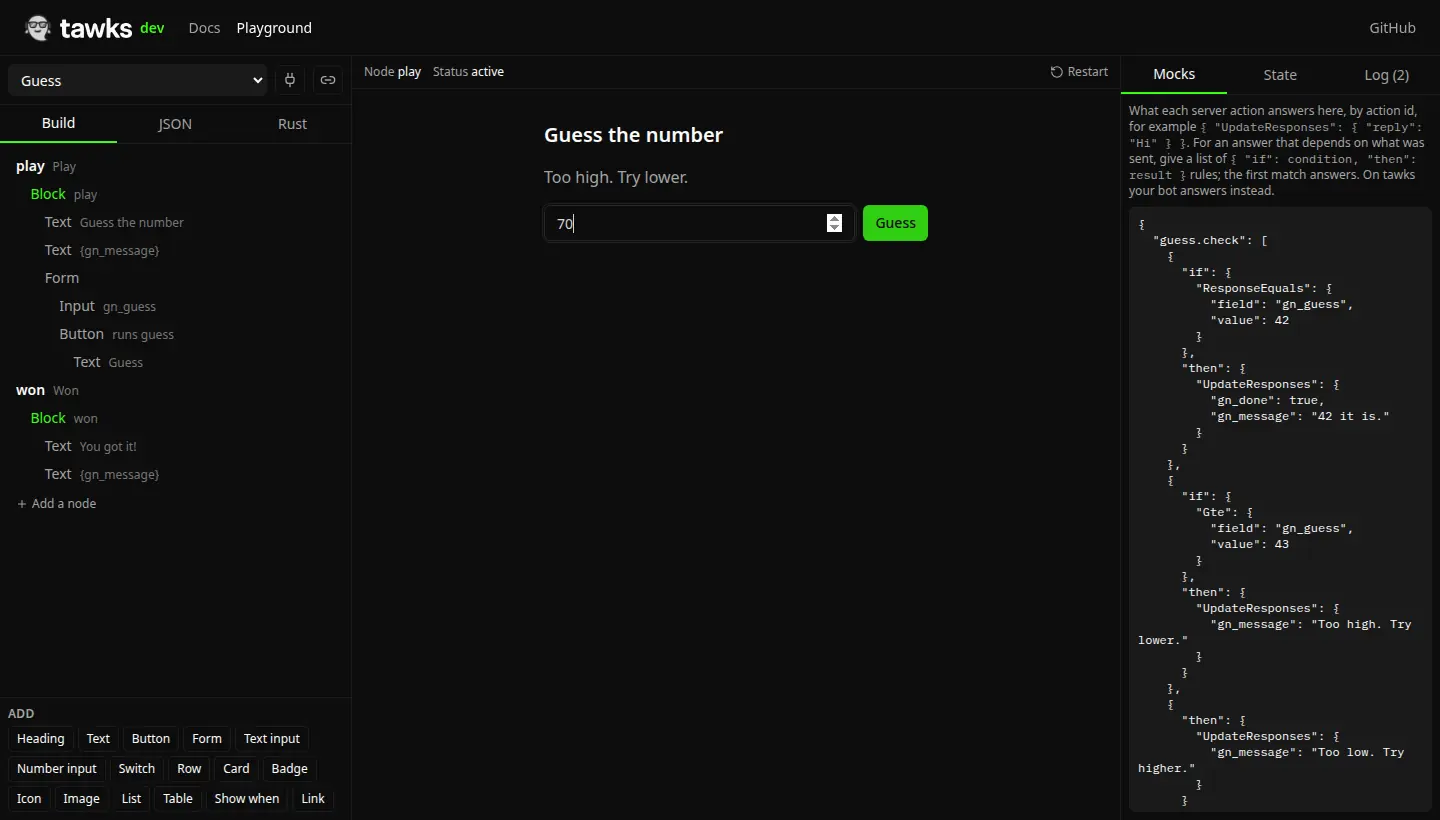
The playground runs a page in your browser with the same node rules, conditions and transforms as tawks. Build on the left, use the page in the middle, and set what each server action answers on the right. Above, a guess of 70 went to the guess.check mock, whose rules answered "Too high". The Rust tab gives you the code for what you built, and the plug button connects to devhost so your real bot answers instead.
Rules of thumb
- Keep one node per view and keep list rows flat. Deeply nested display trees make the page slow to update.
- Prefix your response keys with a short tag (
gn_,pz_) so they never collide with the inputs the app sends or with keys tawks uses, such as$loading. - Send computed booleans for every
Conditioninstead of relying onGteor on missing keys. - Rebuild the full view in one function and return it from every handler. Handlers stay small and the screens never drift out of sync.
- Stick to common Tailwind utilities and the theme tokens. See Styling.
- Try a page in the playground before you deploy it.